
2026 Resume Basics Update: Part 2
While the standard format of resumes hasn’t changed extensively, many subtleties have due to the increased use of application tracking software (ATS) and artificial intelligence (AI) in recruiting departments. These tools have changed how resumes are filtered and sorted, often eliminating applicants before they appear before a recruiter.
It is important to recognize that this article focuses on resumes, not CVs. CVs are intended to present the entire career path, and often include publications, all awards and commendations, volunteer work, and educational coursework. Resumes are summaries of work experience, usually no more than the past 10 years of relevant experience while using your skills section to highlight the full breadth of your relevant achievements.
I have divided this into three parts. The first part outlines what categories must be included on your resume. I summarize what should be included in the section and briefly touch on basic formatting. In the second part, I discuss formatting and syntax in detail. This section is particularly important because it provides insight into how to design your resume so that the recruitment software can identify your qualifications and won’t miss vital information. The final part includes optional categories, some of which were once (at least) highly suggested to include but have fallen out of favor for a variety of reasons.
Formatting
Formatting is one of the major ways that resumes have changed since the rise of ATS and AI systems. These automated systems have significant limitations in parsing the stylized resume designs we were taught to build, so the structure of the modern resume seems spartan and boring. It is important to remind ourselves that we are catering to a very different audience – we need to wind our way through the systems before we reach a recruiter or hiring manager.
It is important to note that there are still fields where stylized resumes may be applicable, particularly in graphic design and other visual arts fields. When you’re designing your resume, be sure to take your industry and company culture into account.
Fonts
The fonts you choose are very important both for how the automated systems parse your information and how legible they are for recruiters and hiring managers. Automated systems may not be able to process stylized fonts, and cursive, calligraphy or hand lettering may be difficult for hiring managers to read. You want to use a standard font, like Calibri, Aptos, Times New Roman, Cambria, or Trebuchet. These fonts are easy to read for both automated systems and hiring personnel.
You can use a combination of serif and sans serif fonts, but I recommend using one for headers and the other for the body text. I tend to use serif fonts, like Times New Roman or Cambria, for headers and sans serif, like Calibri, Aptos, or Trebuchet, for the body text. Using a sans serif font in the body text is easier to scan and can make your resume seem less “busy,” as serif fonts can seem to run together when they’re being scanned. Using a serif font for your headers can add a touch of formality and style, while still being accessible. Be sure to research your industry because some fields, like higher education, may prefer a single serif font.
Be sure you use an appropriate font size. I usually use 10-12 point fonts, depending on the style. Trebuchet and Aptos are wider fonts, so you can go as low as 10 point for your body text. Cambria, Calibri, and Times New Roman are narrower, so I recommend 12 point for body text. I usually adjust the sizing on Titles and Headings so that they don’t overuse the limited page space you have available. I usually use the Title style for the name and adjust it to 16 or 18 point. For section headers, I use the Header 2 style and usually adjust to 14 point.
To set document fonts and design style in Word documents, select the Design menu in your main task bar.
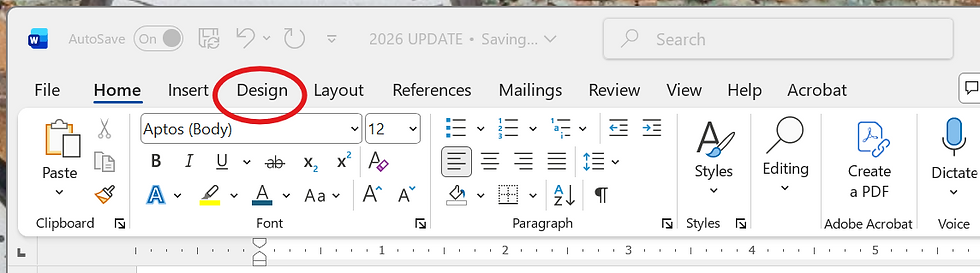
Then, you can choose what fonts, colors, and style design you want to use.


Margins and Spacing
Margins are the blank spaces between the edge of the page and the text. The standard page margin is 1 inch, but you can adjust to .75 or .5 inch if need more space. To change the margin size in Word, select the Layout menu in the main task bar.

The Margins drop down will give you standard options and the ability to customize your margins.

I used to position the name and contact information in the upper margin, but this is no longer recommended. Automated systems have a hard time parsing information in the margins, as they are trained to read specific parts of the page. Instead, I place the name and contact information at the very top of the page.
I usually remove spacing between body text and headers. Some people prefer a bit of space between them, though. This is largely a personal preference and can be impacted by how much information you are trying to include in two pages. To adjust the spacing, go to the Layout menu and use the spacing fields. If you want no spacing between headers and text, be sure to check both sections by placing your cursor in the last line of text and then in the header.
Bullet Lists
Bullet lists have long been a staple of resumes. The main difference in 2026 is to use single columns, as automated systems have a hard time parsing multiple columns. While you can use stylized bullet points, I recommend using a standard bullet so that it more easily transfers into text fields. Stylized bullet items may not transfer, leaving a box or needing excess editing. Automated systems may also have a hard time parsing stylized bullets.
You should also make sure the bullet lists are aligned in the same way. I tend to align to the left margin, but you can also use the standard indent – consistency is the most important thing. The consistency should be throughout the resume, not just in specific sections. For example, if you align the bullet items to the left margin in the skills and experience section, you should also align them with the left margin in the work history section.
As I’ve expressed in Part 1, I don’t usually use bullet items in the education and certification section. If you have multiple majors, minors, are listing specific courses, or have multiple certifications from the same organization, bullet lists may be appropriate.
Keywords and Verb Tenses
While keywords have always been important in resumes, especially in specialized industries, they are vital in an environment that relies on pattern recognition. While you’ll want to avoid excess industry jargon, I recommend you tailor your skills and work history descriptions to match the job listing.
I traditionally used present tense for work history duties. The current best practice is to use present tense for current roles and past tense for older positions. As with older formats, do not use a pronoun at the start of the duties; instead, start with an active verb. Your work history responsibilities may look like:
Work closely with department head and vice president to standardize workflows and build standards of practice
Reconciled banking and credit card statements monthly
This is the second part of a three part series. Part 3 will be available for patrons on Patreon 10/13/2026 and to the public 10/20/2026.

Comments